Pre-Processors
Configure pre-processors to dynamically tag, classify, and moderate user messages before the agent responds.
Overview
Pre-processors execute logic before the user's query is sent to the language model. They evaluate user context, classify intent, or moderate content — and return tags that influence agent behavior.
Tags set by pre-processors can control:
- Which instructions the agent uses (via Conditional Instructions)
- Which prompt shortcuts are visible to the user
- Which tools are available during the conversation
- How the agent routes or personalizes responses
- Whether a message is blocked by guardrails
Pre-processors are configured at the workspace level under Settings > Processors > Pre-Processors, then assigned to individual agents.
Pre-Processor Types
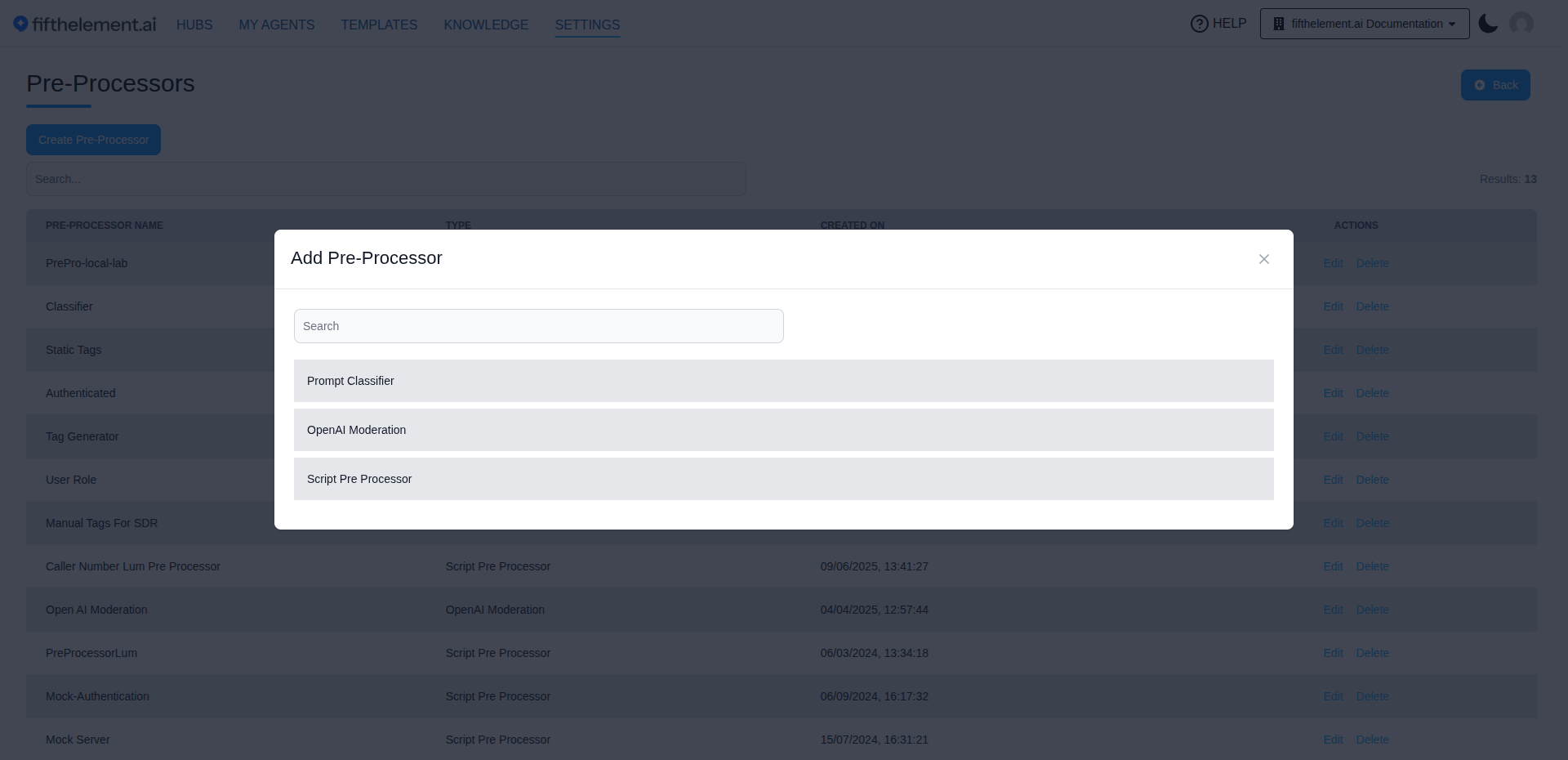
There are three types of pre-processors, each suited to different use cases:
| Type | Description | Best For |
|---|---|---|
| Script Pre Processor | Custom JavaScript function to set tags based on chat context | Auth-based routing, user data tagging, custom logic |
| Prompt Classifier | LLM-based classification and moderation of user prompts | Intent classification, content moderation, guardrails |
| OpenAI Moderation | Wrapper around OpenAI's Moderation API endpoint | Automated content safety screening |
Script Pre Processor
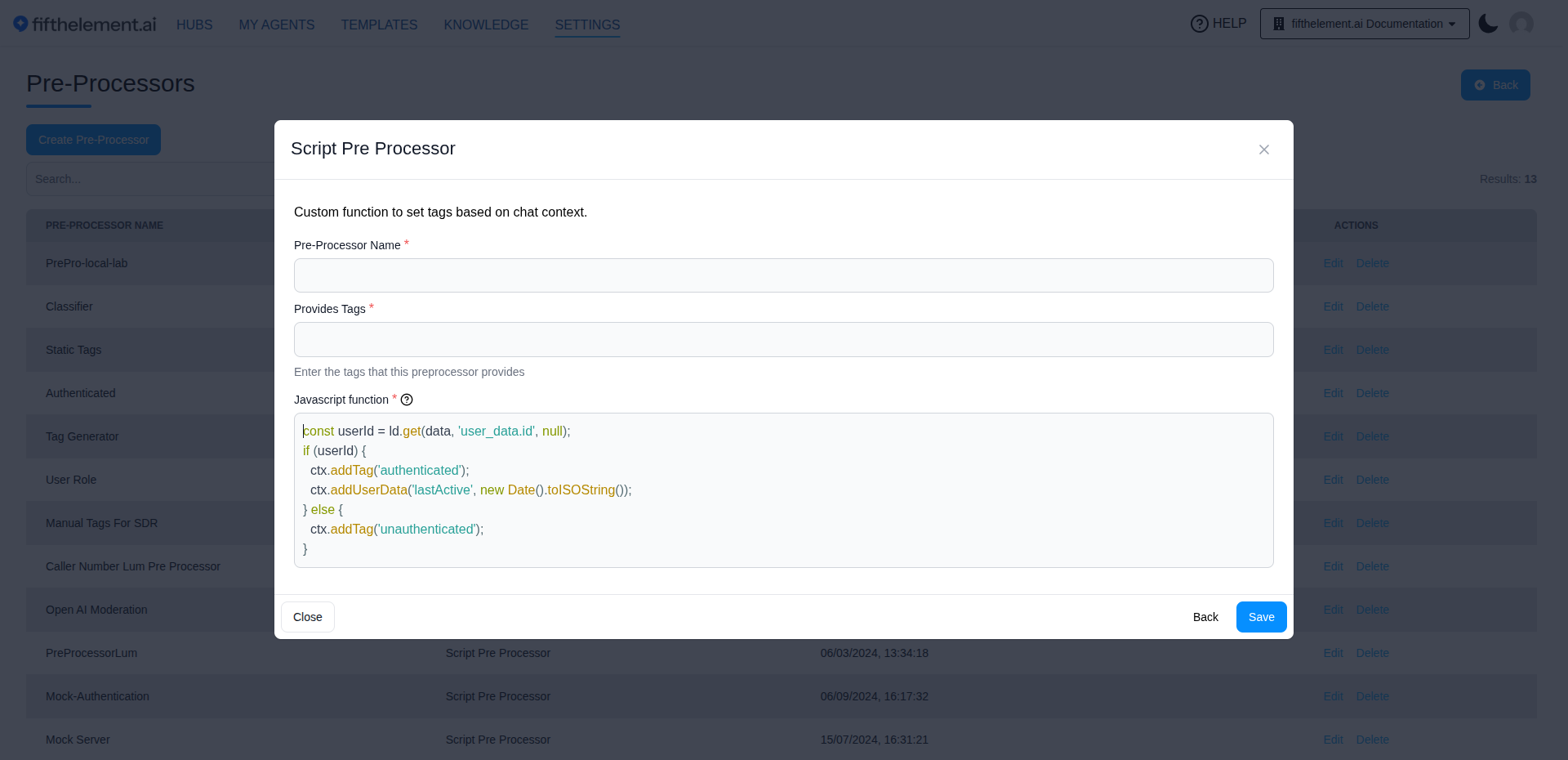
A custom JavaScript function that sets tags based on chat context. This is the most flexible type — you write the logic that evaluates user data and returns tags.
Configuration
| Field | Description |
|---|---|
| Pre-Processor Name | A descriptive name for this pre-processor |
| Provides Tags | The tags this pre-processor can return |
| Javascript function | The JavaScript code that evaluates context and sets tags |
How It Works
- User sends a message
- The script executes with access to user session data
- The script calls
ctx.addTag()to set tags based on its logic - Tags are applied to the conversation, controlling agent behavior
Example: Authentication-Based Tagging
const userId = ld.get(data, 'user_data.id', null);
if (userId) {
  ctx.addTag('authenticated');
  ctx.addUserData('lastActive', new Date().toISOString());
} else {
  ctx.addTag('unauthenticated');
}
This sets an authenticated or unauthenticated tag, which can then drive:
- Showing different prompt shortcuts to logged-in vs. anonymous users
- Applying different conditional instructions based on auth status
- Enabling specific tools only for authenticated sessions
Prompt Classifier
An LLM-powered pre-processor that classifies user prompts by intent, topic, or content type. It can also act as a guardrail to block inappropriate messages before they reach the agent.
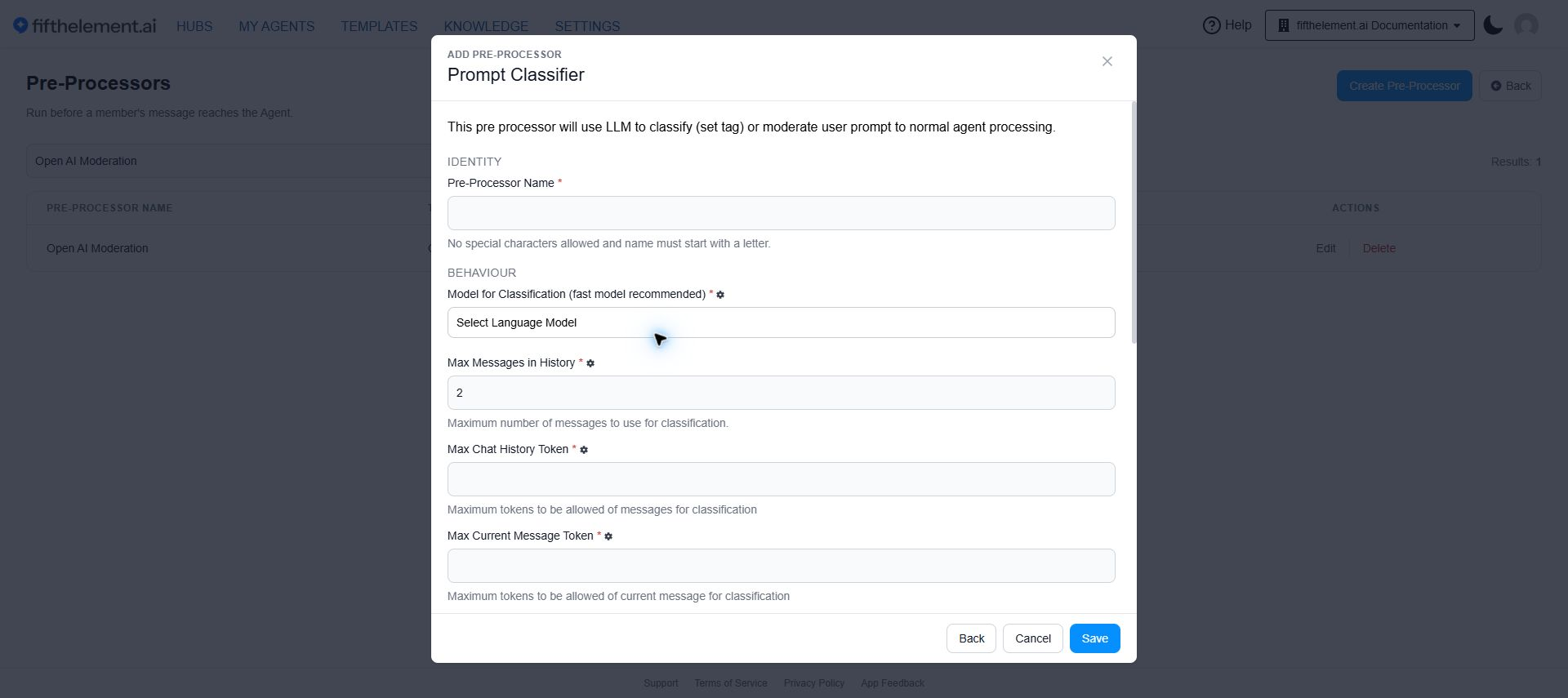
- Select Prompt Classifier in Create Pre-Processor.
- Name the processor, select the classification model, and enter the history and current-message token limits.
- Scroll down to add Classification Tags, optional Guardrail Tags, and the Reject Response.
- Review the Classification Prompt, then click Save.
Configuration
| Field | Required | Description |
|---|---|---|
| Pre-Processor Name | Yes | A descriptive name |
| Model for classification | Yes | The language model to use for classification. A fast model is recommended for low latency |
| Max Messages in History | Yes | Maximum number of previous messages to include for classification context (default: 2) |
| Max Chat History Token | Yes | Maximum tokens allowed from chat history for classification |
| Max Current Message Token | Yes | Maximum tokens allowed from the current message for classification |
| Classification Tags | Yes | Define each tag with a description and tag output value. The LLM selects from these based on the message content |
| Guardrail Tags | No | Tags that trigger message rejection. If the LLM classifies a message with a guardrail tag, the user prompt is declined |
| Reject Response | No | The message shown to the user when their prompt is blocked (e.g., "Your message violates our policies and cannot be processed.") |
| Classification Prompt | Yes | The system prompt that instructs the LLM how to classify messages. A default prompt is provided |
How It Works
- User sends a message
- The classification LLM evaluates the message (and optionally chat history) against the defined tags
- The LLM returns one or more matching tags
- If any returned tag is a guardrail tag, the message is blocked and the reject response is shown
- Otherwise, tags are applied to the conversation for conditional behavior
Classification Prompt
A default classification prompt is provided that instructs the LLM to:
- Read conversation history and the current message
- Select the most appropriate tags from the defined list
- Prioritize the most recent message while considering full context
- Return zero to five tags with high confidence
Customization
You can customize the classification prompt to match your specific use case. The prompt supports placeholders: {{chat_messages}}, {{message}}, and {{tags}}.
Use Cases
- Intent routing: Classify messages as
sales,support,billingto route to different instruction sets - Content moderation: Flag
inappropriate,spam,off_topicmessages and block them with guardrail tags - Sentiment detection: Tag messages as
positive,negative,neutralfor analytics
OpenAI Moderation
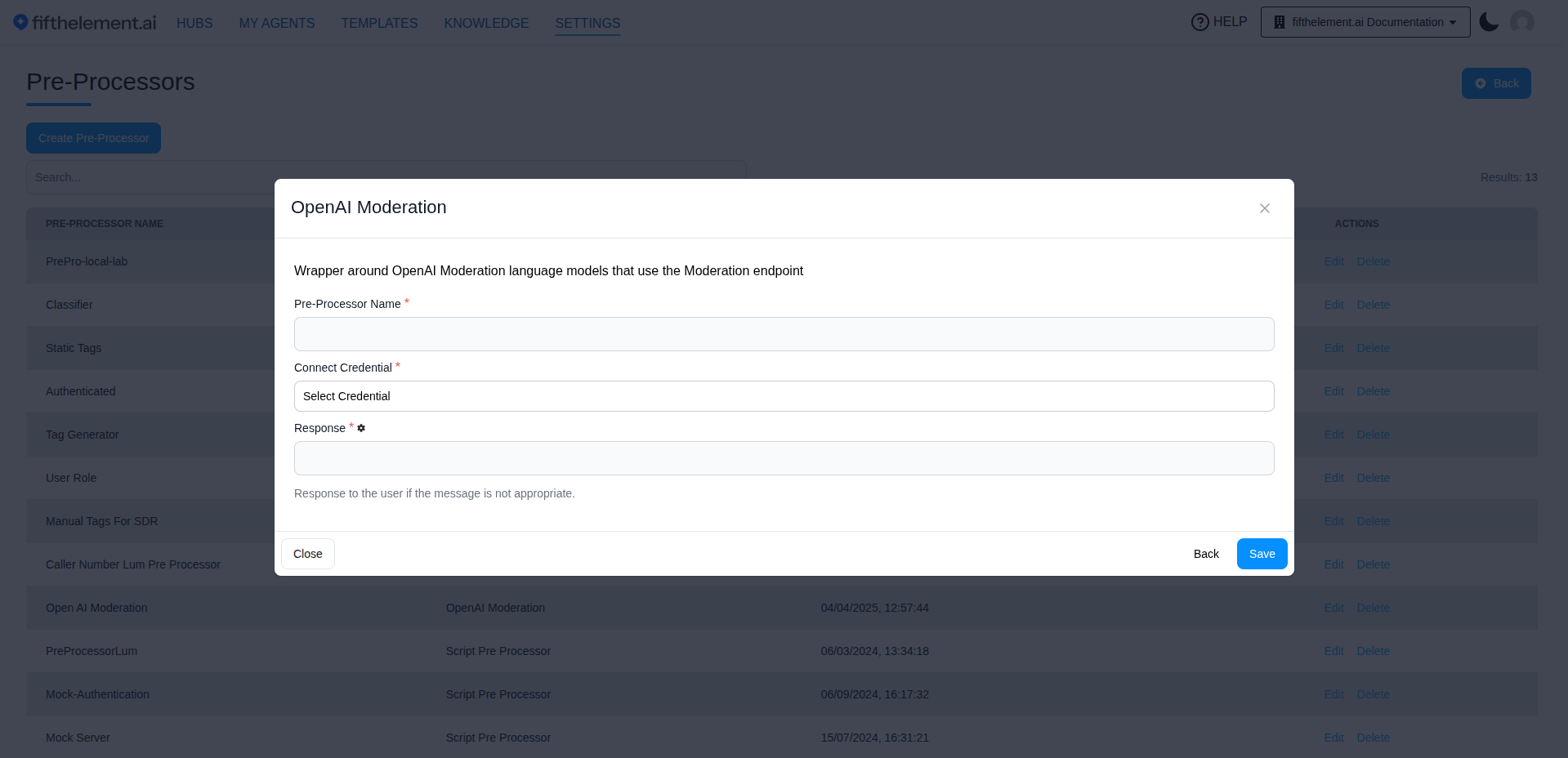
A wrapper around OpenAI's Moderation API endpoint that automatically screens user messages for harmful content.
Configuration
| Field | Required | Description |
|---|---|---|
| Pre-Processor Name | Yes | A descriptive name |
| Connect Credential | Yes | Select the OpenAI credential configured under Settings > Security & Access > Credentials |
| Response | Yes | The message shown to the user when their message is flagged as inappropriate |
How It Works
- User sends a message
- The message is sent to OpenAI's Moderation API
- If the API flags the content (violence, hate speech, sexual content, etc.), the message is blocked
- The configured reject response is shown to the user
- If the message passes moderation, it proceeds to the agent normally
When to use
Use OpenAI Moderation for broad, automated content safety screening. For more nuanced classification with custom categories, use the Prompt Classifier instead.
Assigning Pre-Processors to Agents
Once created at the workspace level, pre-processors must be assigned to individual agents:
- Navigate to the agent's Pre Processors module
- Click "Add"
- Select a configured pre-processor from the list
- Review the attached processor. Configure its tag-generation logic in Settings > Processors > Pre-Processors, not in the attachment picker.
- Click "Save"
Multiple Pre-Processors
You can assign multiple pre-processors to a single agent. Each one runs independently and can set its own tags. For example, you might combine a Script Pre Processor for auth tagging with a Prompt Classifier for intent routing.
System Tags
In addition to custom tags from pre-processors, the platform provides built-in system tags:
| Tag | Description |
|---|---|
internal_no_message | Automatically applied at conversation start, removed on the first user message. Useful for triggering initial prompt shortcuts |
internal_authenticated | Applied when a user completes Internal Authentication on the floating widget |
internal_unauthenticated | Applied when a user has not authenticated on the floating widget |
Common Use Cases
| Use Case | Pre-Processor Type | Tags | Effect |
|---|---|---|---|
| Auth-based personalization | Script | authenticated / unauthenticated | Show different shortcuts and instructions |
| Intent routing | Prompt Classifier | sales / support / billing | Route to different conditional instructions |
| Content moderation | OpenAI Moderation or Prompt Classifier | Guardrail tags | Block inappropriate messages |
| Subscription tiers | Script | free / premium / enterprise | Gate features and tools by plan |
| Geographic routing | Script | region_us / region_eu / region_in | Localize responses and compliance |
| Initial greeting | System tag | internal_no_message | Display welcome shortcuts before first message |
Related Topics
- Post-Processors — Process agent output after the response
- Tools — Configure tools that pre-processors can gate
- Agent Builder — Advanced Configuration — Assign pre-processors to agents and configure conditional behavior
- Back to Settings