Entity Memory
Let agents keep durable facts about the subjects they talk about, such as accounts, people, opportunities, competitors and products, and use them in later conversations.
Overview
With Entity Memory an agent remembers what it learns across conversations and across users. Each subject is a profile holding a short memory of dated one-line facts under section headings. Profiles live in a Memory Bank, and agents that use the same bank share it.
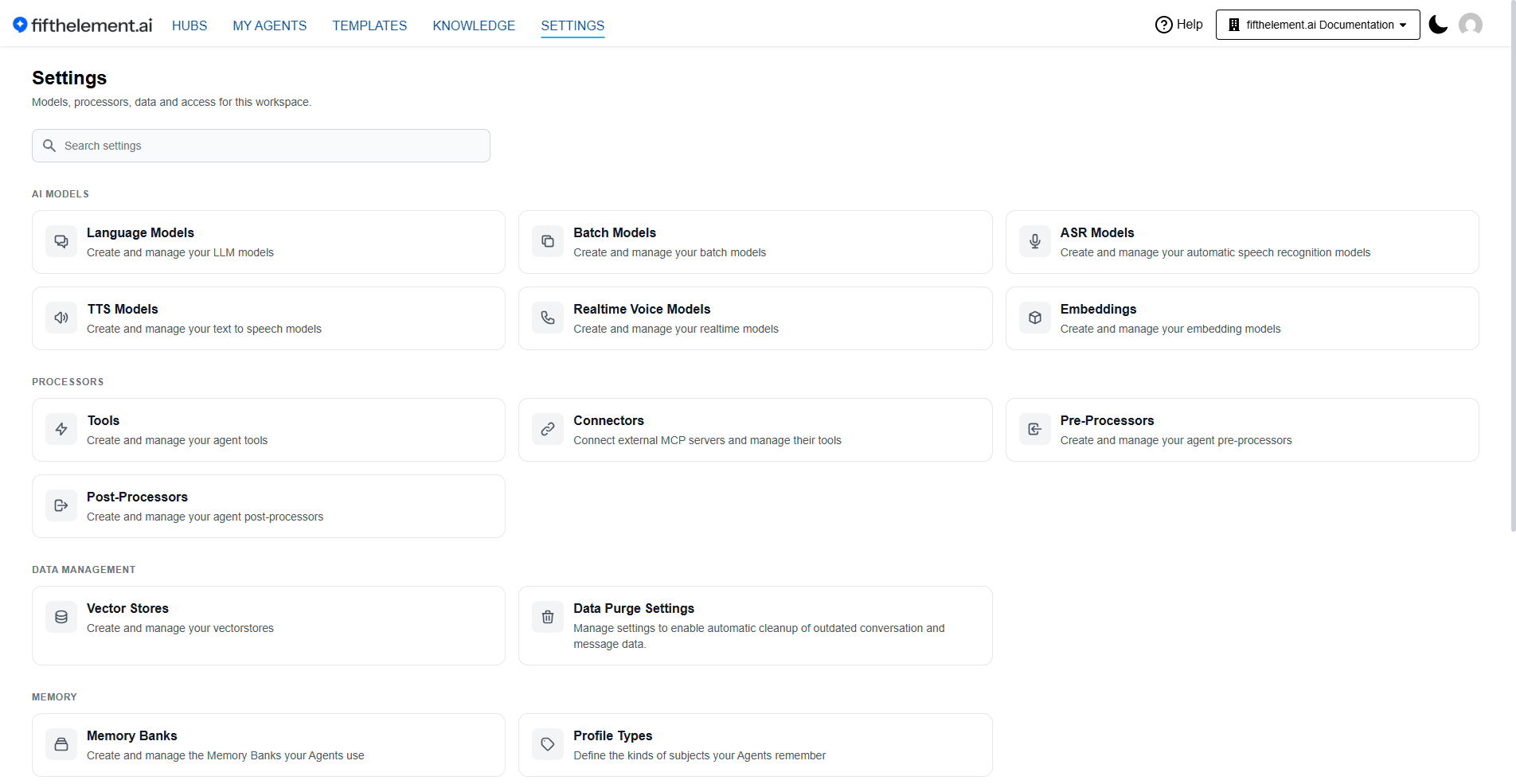
Settings landing page. Memory Banks and Profile Types sit in the Memory group; the Entity Memory tool is created under Processors > Tools.
Building Blocks
| Block | Where | What it holds |
|---|---|---|
| Memory store | Knowledge > Create Knowledge Base, Type Memory. The dialog becomes Create Memory Store; a Vector Store is required | The index that lets agents find profiles by meaning |
| Memory Bank | Settings > Memory > Memory Banks | The profiles, the size limit and the consolidation settings |
| Profile Types | Settings > Memory > Profile Types | The kinds of subjects agents remember: twelve built-in types plus your own |
| Entity Memory tool | Settings > Processors > Tools > Create Tool > Entity Memory, then the agent's Tools & Artifacts | Connects an agent to a bank and sets how memory is read and written |
| Profiles | A bank's Profiles page | The subjects and their memories |
A memory store that a bank uses has no Add Document(s) action. Its documents are written by the bank as agents learn; add and change memories through Memory Banks.
How Memory Is Read
- During chat the agent can look subjects up by name or meaning, read their profiles and search memories. Answers carry "as of" dates
- Shared across users. A fact captured in one user's conversation is available to another user of an agent on the same bank and scope
- Using memory is up to the agent's instructions. An agent whose instructions never mention its memory may read memory yet not use it in its answer. Tell the agent to look up memory for the subjects in the conversation, and how to label values it takes from memory
How Memory Is Written
| Path | When | Detail |
|---|---|---|
| End of conversation | After the agent's Conversation Inactivity Duration (Behavior Flags, minimum 10 minutes) | One model call extracts what is worth keeping and files it under profiles, creating profiles when needed. Allow up to about 25 minutes. Each run appears under Account menu > Batch Monitoring > Conversation Processor |
| On request | During the chat, when Let The Agent Record On Request is on | "Remember that ..." is saved at once. A correction replaces the old value rather than adding a second one |
| Import | From the bank's Profiles page | Paste profiles exported from another assistant. See Memory Banks |
| Edit memories | From a profile's Memories view | Describe a change in plain words, review the proposed changes, then apply them |
Each memory is one short line with its source and date, grouped under section headings. Capture runs for Chat agents and for Search agents with retrieval; it does not run for voice conversations.
The Entity Memory Tool
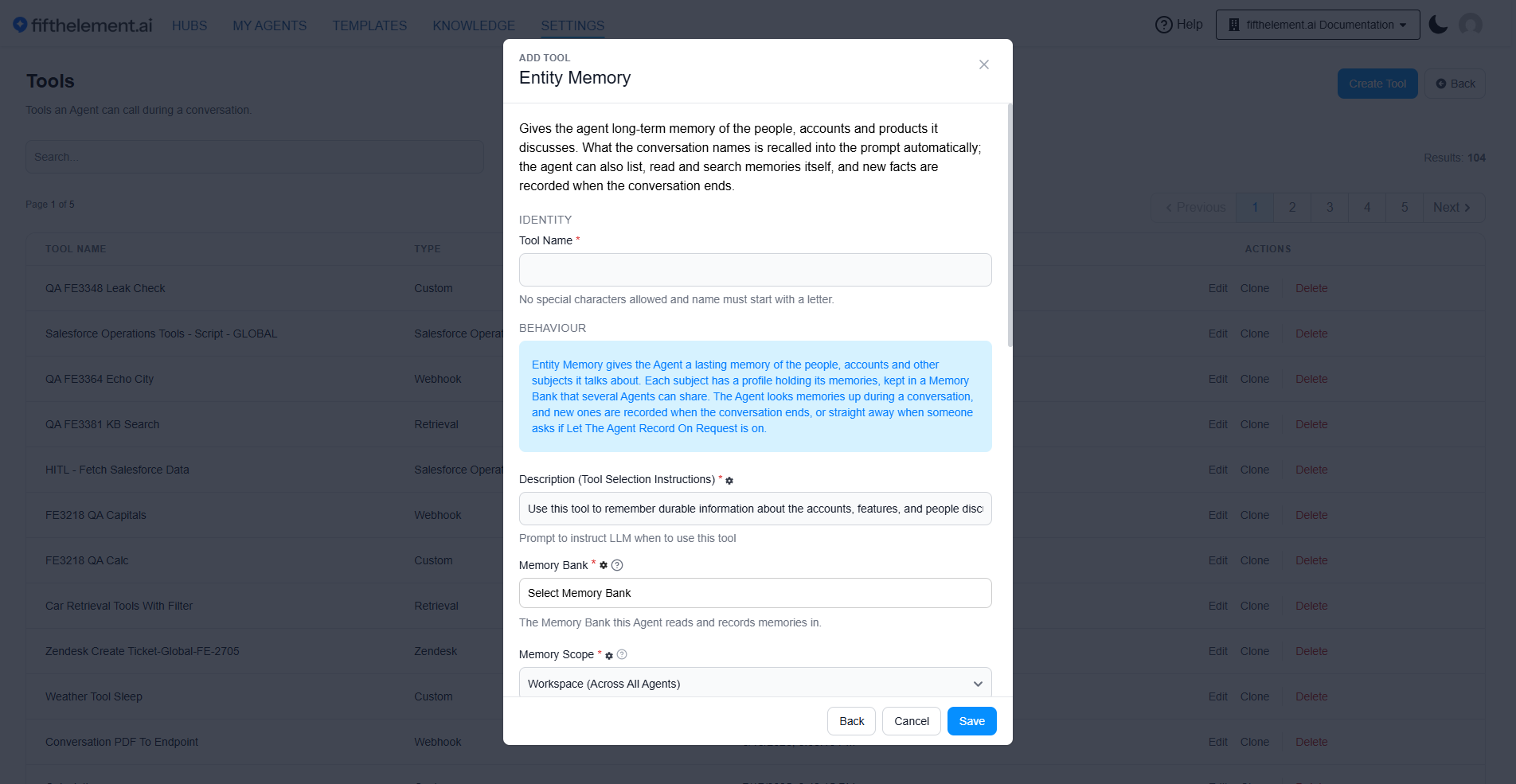
Create Tool > Entity Memory. The form opens with Memory Scope set to Workspace.
| Field | Required | Description |
|---|---|---|
| Tool Name | Yes | No special characters; must start with a letter |
| Description (Tool Selection Instructions) | Yes | Tells the model when to use the tool |
| Memory Bank | Yes | The bank this agent reads and records memories in |
| Memory Scope | Yes | Which part of the bank this agent uses (see below). Changing it on a live agent hides the profiles it already has |
| Profile Types | Yes | Which profile types this agent may record and read |
| Recall Only (No Writing) | No | The agent only reads the bank. Nothing is recorded, including at the end of a conversation |
| Let The Agent Record On Request | No | Off by default. Lets the agent record a fact when someone asks it to, or correct one they say is wrong |
| Fact Style Guidance | No | Extra guidance on how recorded memories should be written |
| Profile Types Listed In The Memory Map | No | Types whose profiles are listed for the agent each turn. Leave empty to list none; the agent then looks profiles up itself |
| Show Descriptions In Map | No | Adds each profile's description to its row in the map |
| Prefetch Memories Into The Prompt | No | Places the full memories of any subject the conversation names into the prompt, so the agent answers without first calling the read tool. Shows a Prefetch Size Limit |
| Ask before running | No | Asks the person in the chat before each memory action. See Tool Approvals |
| Advanced parameters | No | Profiles Listed Per Type, Semantic Selection Threshold, Memories Returned Per Search, Profiles Read Per Call, Linked Memories Per Profile, Linked Size, Always Load |
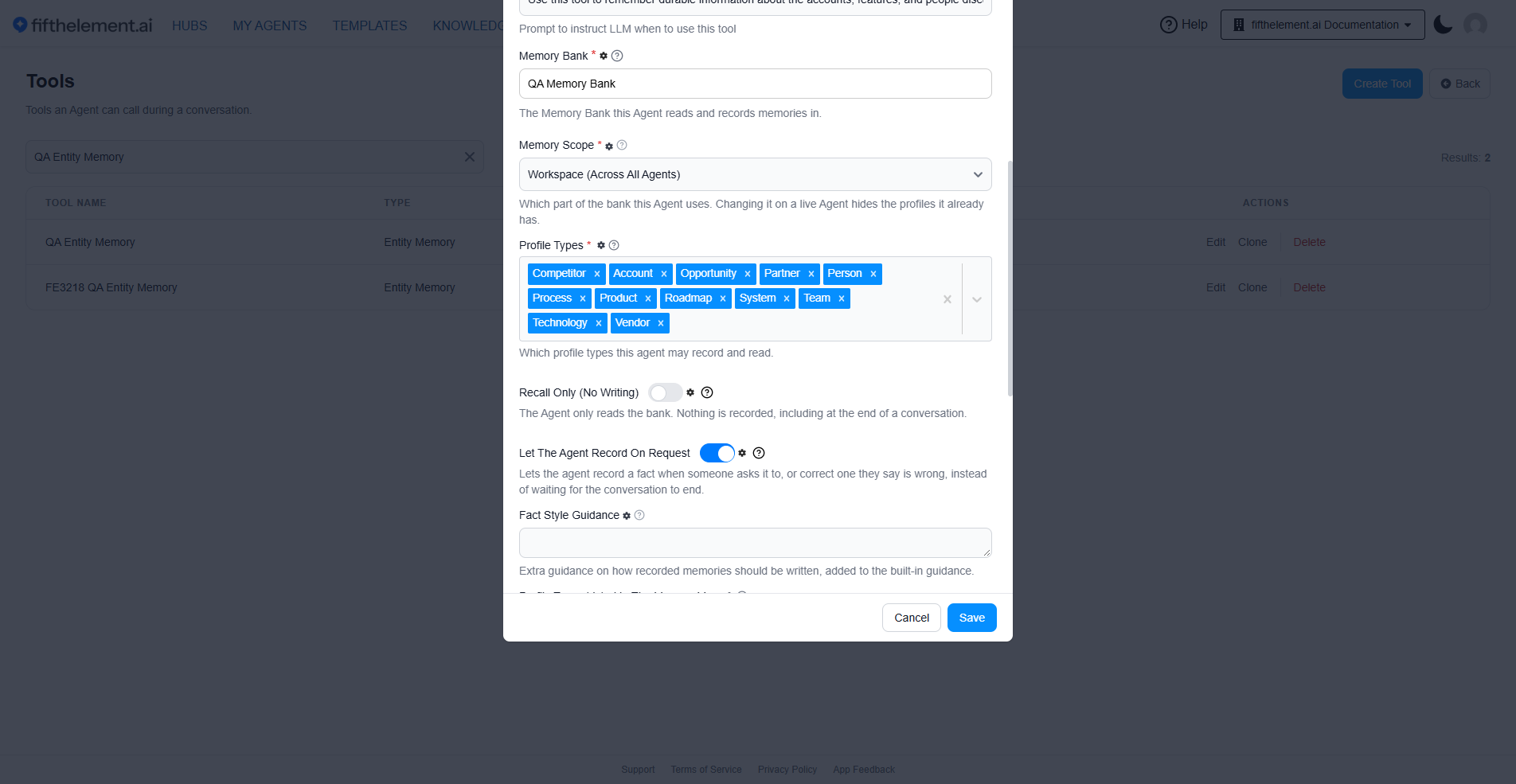
A configured Entity Memory tool showing Memory Bank, Memory Scope and Profile Types.
Tool settings are copied per agent
Saving an Entity Memory tool under Settings > Tools warns that changes do not apply to agents already using the tool. Change an agent's copy from the agent's Tools & Artifacts.
Memory scope
| Scope | Shared by | Note |
|---|---|---|
| Workspace (Across All Agents) | Every agent using the bank with Workspace scope | Imported profiles are always Workspace scope. This is the default for a new tool |
| Agent (Across All Agent Conversations) | All users of one agent | Other agents on the bank do not see it |
| User (Across All User Conversations) | One end user across their conversations | Needs a signed-in user |
| Conversation (Entire Conversation) | One conversation | A new chat starts empty |
Setting Up Entity Memory
- Create a Vector Store if the workspace has none, under Settings > Data Management > Vector Stores
- Create a memory store: Knowledge > Create Knowledge Base, Type Memory, pick the Vector Store
- Review Profile Types. System types are read-only; clone one to customise it
- Create a Memory Bank on that store
- Create the Entity Memory tool under Settings > Processors > Tools and attach it to the agent under Tools & Artifacts
- Set the agent's Conversation Inactivity Duration under Behavior Flags
- Tell the agent in its instructions to look up memory for the subjects it discusses
- Grant the memory permissions to the roles that need them, and optionally import existing profiles
Permissions and Audit
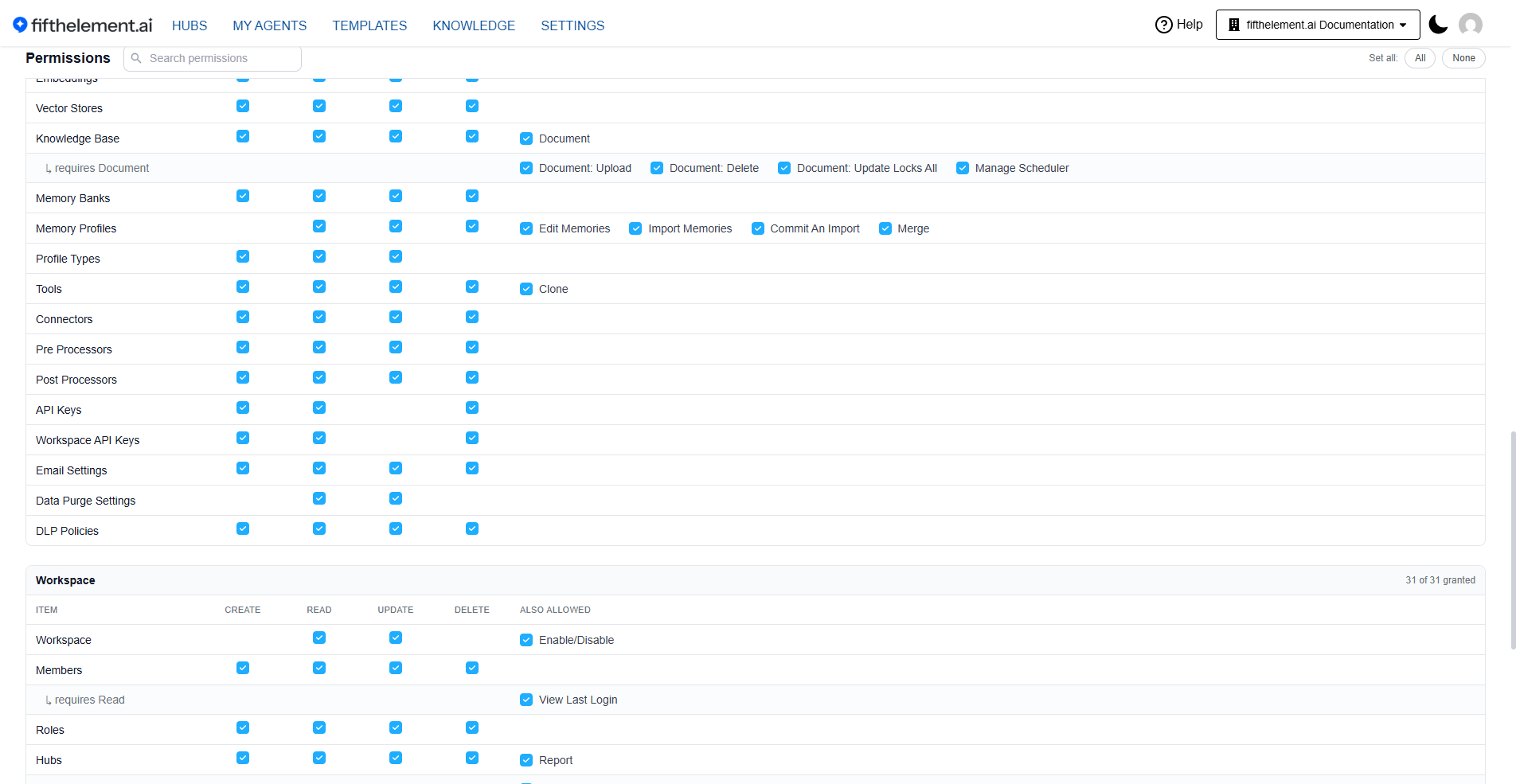
Role editor showing the Memory Banks, Memory Profiles, Profile Types and Connectors permission rows.
Entity Memory is permission-controlled. Roles gain three permission groups under Settings:
| Group | Actions |
|---|---|
| Memory Banks | Create, Read, Update, Delete. Read also shows the Memory entries in Settings |
| Memory Profiles | Read, Update, Delete, plus Edit Memories, Import Memories, Commit An Import and Merge |
| Profile Types | Create, Read, Update |
The seeded Admin role receives them by default; grant them to other roles under Workspaces > Roles. Agent access follows the role's Agents scope.
Changes to memory banks, profiles, profile types and merge proposals are recorded in the Audit Trail under Workspaces > Audit Trail. Capture runs appear under Account menu > Batch Monitoring > Conversation Processor, with the tool, the bank and the agent on each row.
Related Topics
- Memory Banks - Banks, profiles, import and consolidation
- Profile Types - System and custom profile types
- Tools - Create the Entity Memory tool
- Tool Approvals - Ask before running on memory actions
- RBAC & Roles - Grant the memory permissions
- Back to Settings