Web Crawling
Crawl websites, Confluence spaces, SharePoint libraries, and other web sources to populate your knowledge bases.
Overview
Web crawling allows you to automatically extract content from websites and external platforms into your knowledge bases. The platform supports multiple crawl methods — from standard website crawling to specialized connectors for Confluence, SharePoint/OneDrive, and bulk URL imports.
To start a crawl, navigate to a Knowledge Base, click Add Document(s), and select a crawl method from the Crawl section.
Crawl Methods
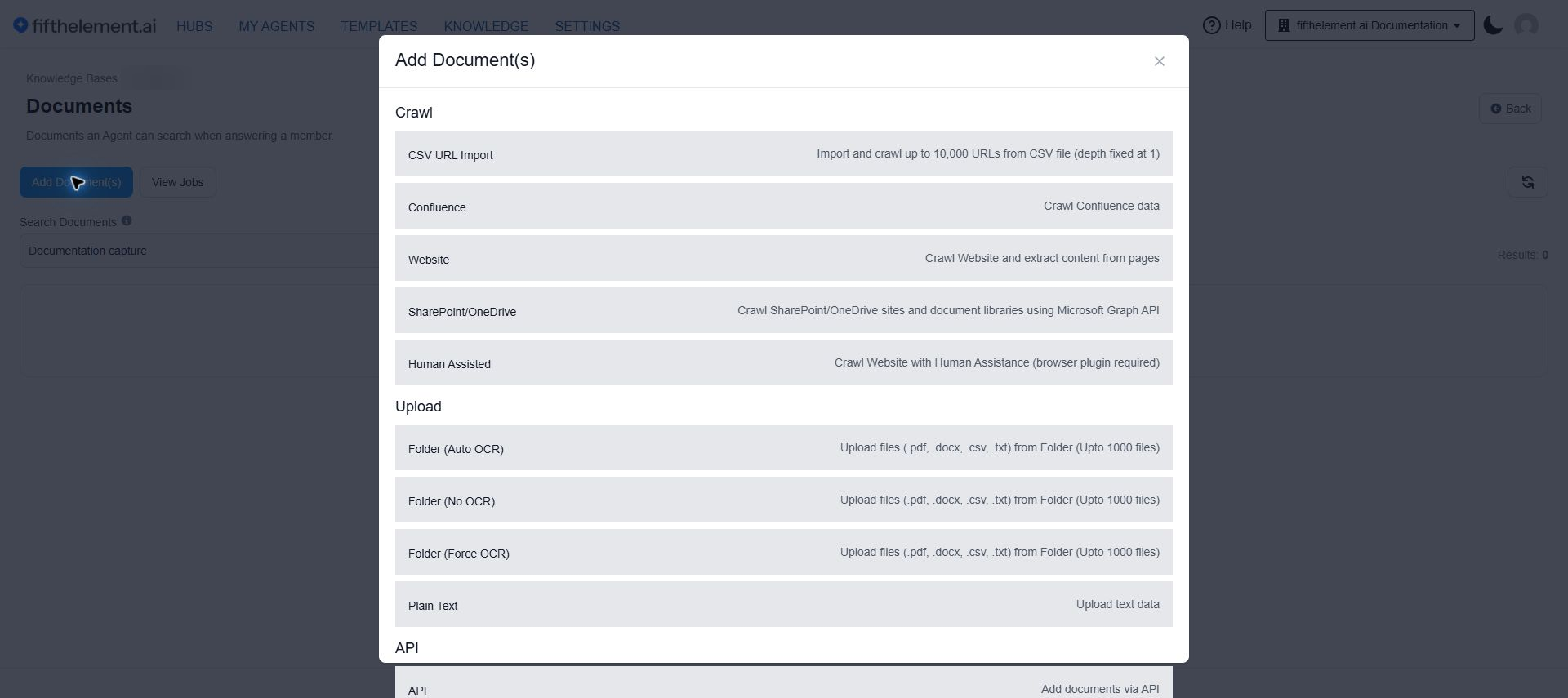
| Method | Description |
|---|---|
| Website | Crawl website and extract content from pages — the most widely used crawl type |
| CSV URL Import | Import and crawl up to 10,000 URLs from a CSV file (depth fixed at 1) |
| Confluence | Crawl Confluence spaces using Atlassian API |
| SharePoint/OneDrive | Crawl SharePoint/OneDrive sites using Microsoft Graph API |
| Human Assisted | Crawl with human assistance using a browser plugin (for authenticated sites) |
Website Crawl
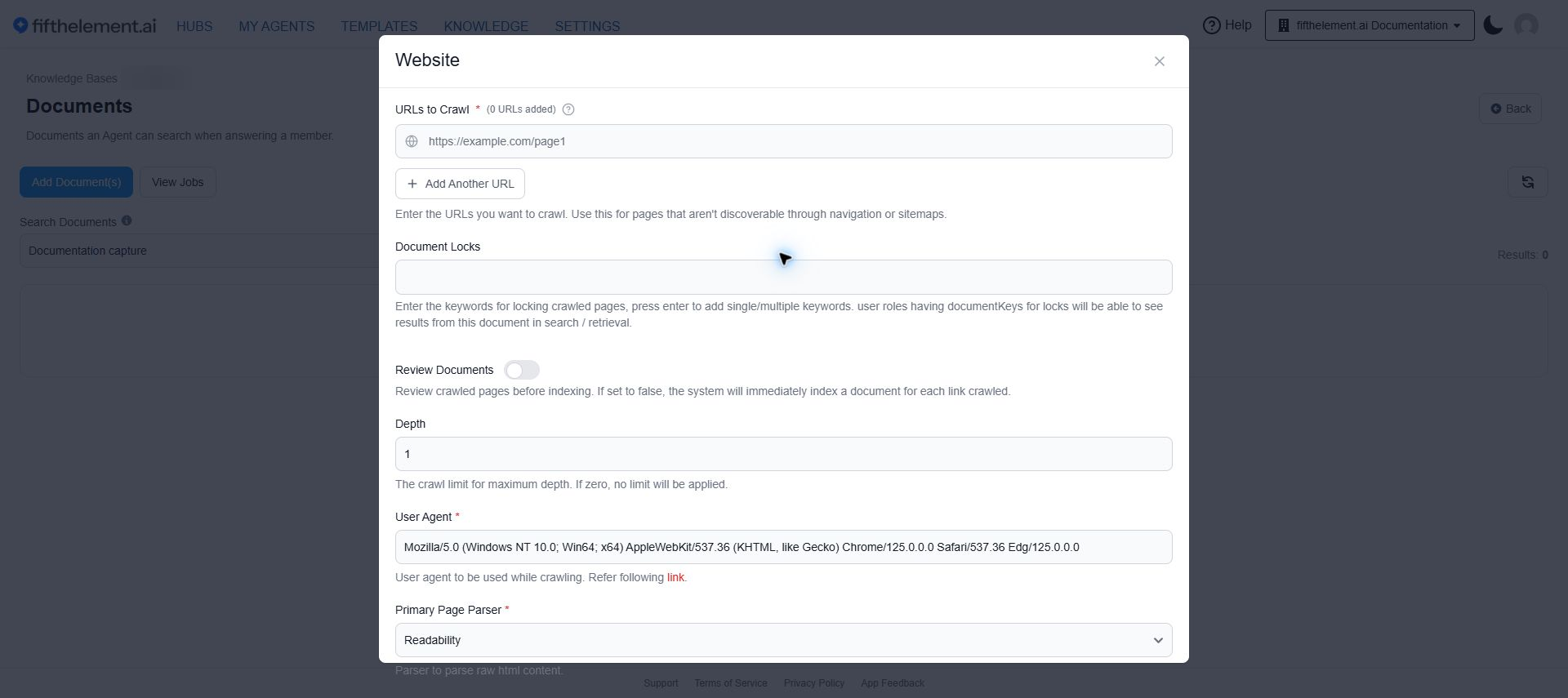
The most relevant and widely used crawl type. Crawls a website starting from one or more URLs and extracts content from discovered pages.
Configuration
| Field | Required | Default | Description |
|---|---|---|---|
| URLs to Crawl | Yes | — | Enter one or more starting URLs. Use "Add Another URL" for pages not discoverable through navigation or sitemaps |
| Document Locks | No | — | Keywords for restricting document access. Only users with matching role document keys can see results |
| Review Documents | No | Off | Review crawled pages before indexing. If off, pages are immediately indexed |
| Depth | No | 1 | Maximum crawl depth. Set to 0 for no limit |
| User Agent | Yes | Mozilla/5.0... | User agent string used while crawling |
| Primary Page Parser | Yes | Readability | Parser for raw HTML content |
| Secondary Page Parser | Yes | None (Fast) | AI-powered content processing. Requires Document Content Processing enabled in knowledge base settings |
| Document Processor | Yes | Native (Fast) | Document processing method. Supports .pdf, .docx, .pptx |
Additional Parameters
Expand Advanced parameters in the form.
| Field | Required | Default | Description |
|---|---|---|---|
| Max Pages | Yes | 50 | Maximum pages to crawl per website |
| Min Content Length | Yes | 50 | Minimum content length (characters) for indexing |
| Maximum crawl rate (pages per minute) | No | 0 | Pace the crawl across sites. 0 applies no rate limit; a positive value can slow the crawl, not accelerate it |
| Include/Exclude Mode | Yes | Exclude | Choose whether to include or exclude (skip) URL patterns |
| Skip Path | No | — | Regex patterns or URLs to skip during crawling |
| Skip Path From Index | No | — | Regex patterns or URLs to skip during indexing |
| External domains | No | Off | Allow external domains to be included |
| Force Update | No | Off | Override crawled pages even if source hasn't changed |
| Use Sitemaps | No | Off | Use sitemaps to discover URLs |
| Use Browser | No | On | Use browser rendering for crawling. Slower but better for dynamic sites |
| Headless Browser | No | On | Faster crawling but may not work well with dynamic websites |
Testing
Before enabling/disabling "Use Browser" or changing Content Parser, test by indexing one page with no additional links, then review the results.
CSV URL Import
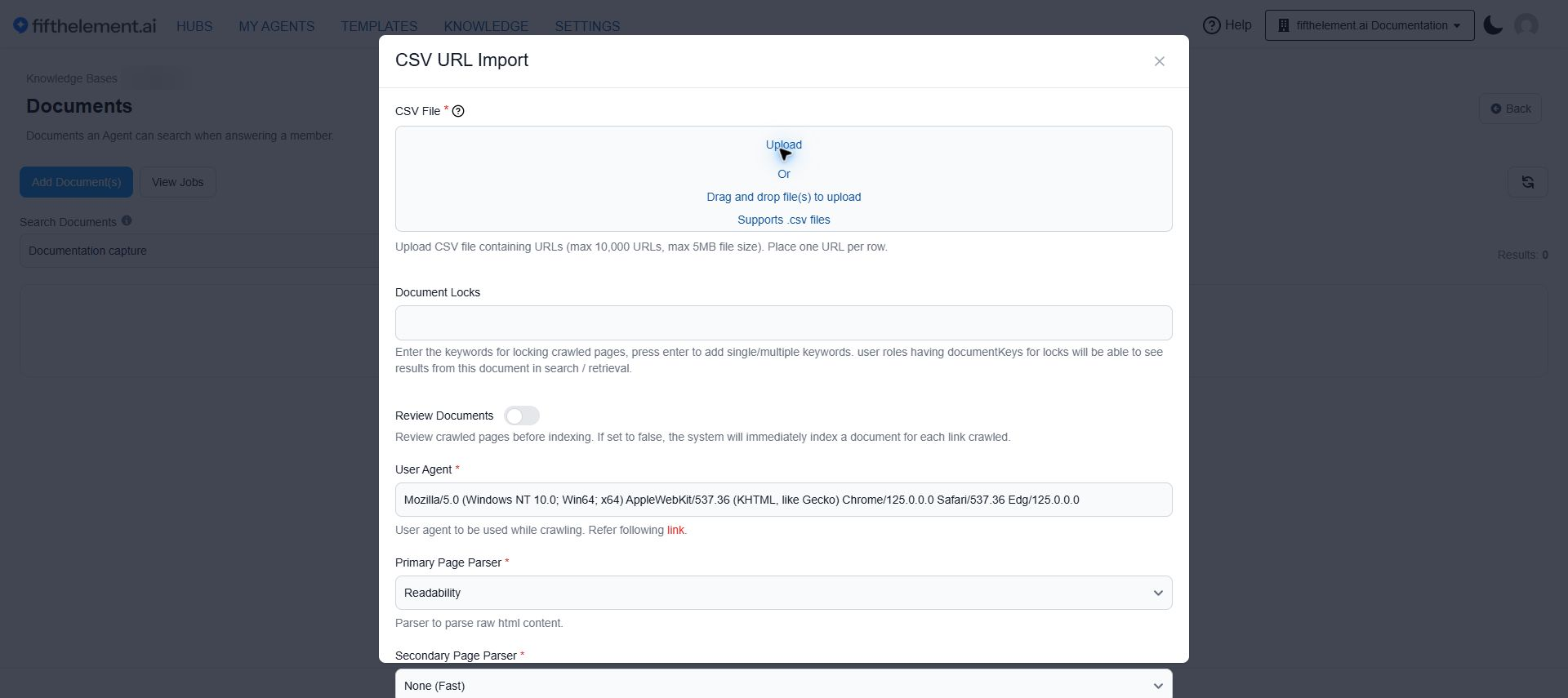
Import a list of URLs from a CSV file for bulk crawling. This saves time by targeting specific pages instead of traversing an entire website.
Configuration
| Field | Required | Default | Description |
|---|---|---|---|
| CSV File | Yes | — | Upload a CSV file containing URLs (max 10,000 URLs, max 5MB). One URL per row |
| Document Locks | No | — | Keywords for restricting document access |
| Review Documents | No | Off | Review crawled pages before indexing |
| User Agent | Yes | Mozilla/5.0... | User agent string |
| Primary Page Parser | Yes | Readability | HTML content parser |
| Secondary Page Parser | Yes | None (Fast) | AI-powered content processing |
| Document Processor | Yes | Native (Fast) | Document processing method |
Additional Parameters
Expand Advanced parameters in the form.
| Field | Required | Default | Description |
|---|---|---|---|
| Max Pages | Yes | 1000 | Maximum pages to crawl per URL. Depth is automatically set to 1 for CSV imports |
| Min Content Length | Yes | 50 | Minimum content length for indexing |
| Maximum crawl rate (pages per minute) | No | 0 | Pace the crawl across sites. 0 applies no rate limit; a positive value can slow the crawl, not accelerate it |
| Force Update | No | Off | Override pages even if source hasn't changed |
| Use Browser | No | On | Use browser rendering |
| Headless Browser | No | On | Faster browser crawling |
Confluence
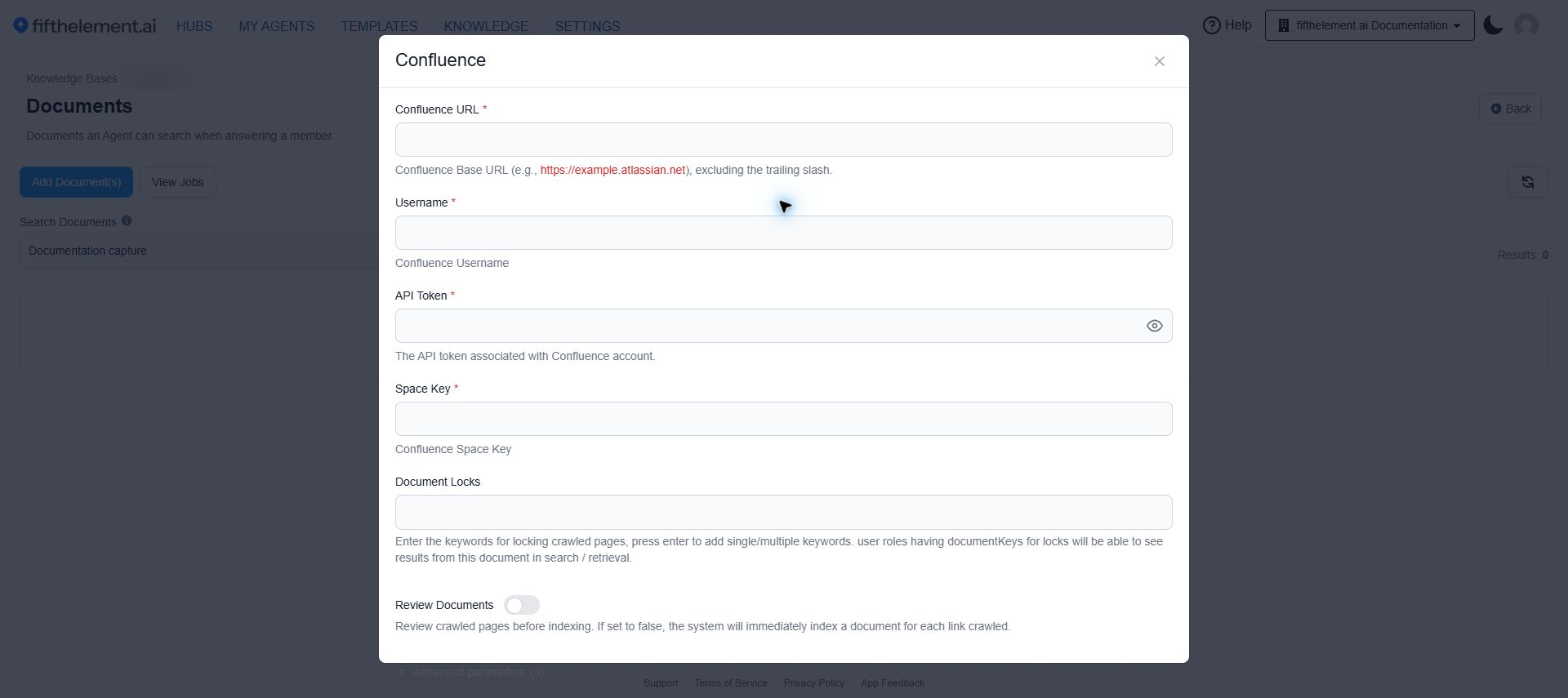
Crawl Confluence spaces using the Atlassian API to import wiki pages and documentation.
Configuration
| Field | Required | Default | Description |
|---|---|---|---|
| Confluence URL | Yes | — | Confluence Base URL (e.g., https://example.atlassian.net), excluding trailing slash |
| Username | Yes | — | Confluence username |
| API Token | Yes | — | API token associated with the Confluence account |
| Space Key | Yes | — | Confluence Space Key to crawl |
| Document Locks | No | — | Keywords for restricting document access |
| Review Documents | No | Off | Review crawled pages before indexing |
Additional Parameters
Expand Advanced parameters in the form.
| Field | Required | Default | Description |
|---|---|---|---|
| Maximum Pages | No | 50 | Maximum pages to crawl in the specified space |
| Minimum Content Length | No | 50 | Minimum characters for a page to be indexed |
| Confluence Page(s) | No | — | Specify page title(s) to crawl. The specified page and its child pages will be included. If blank, all pages in the space are crawled |
SharePoint/OneDrive
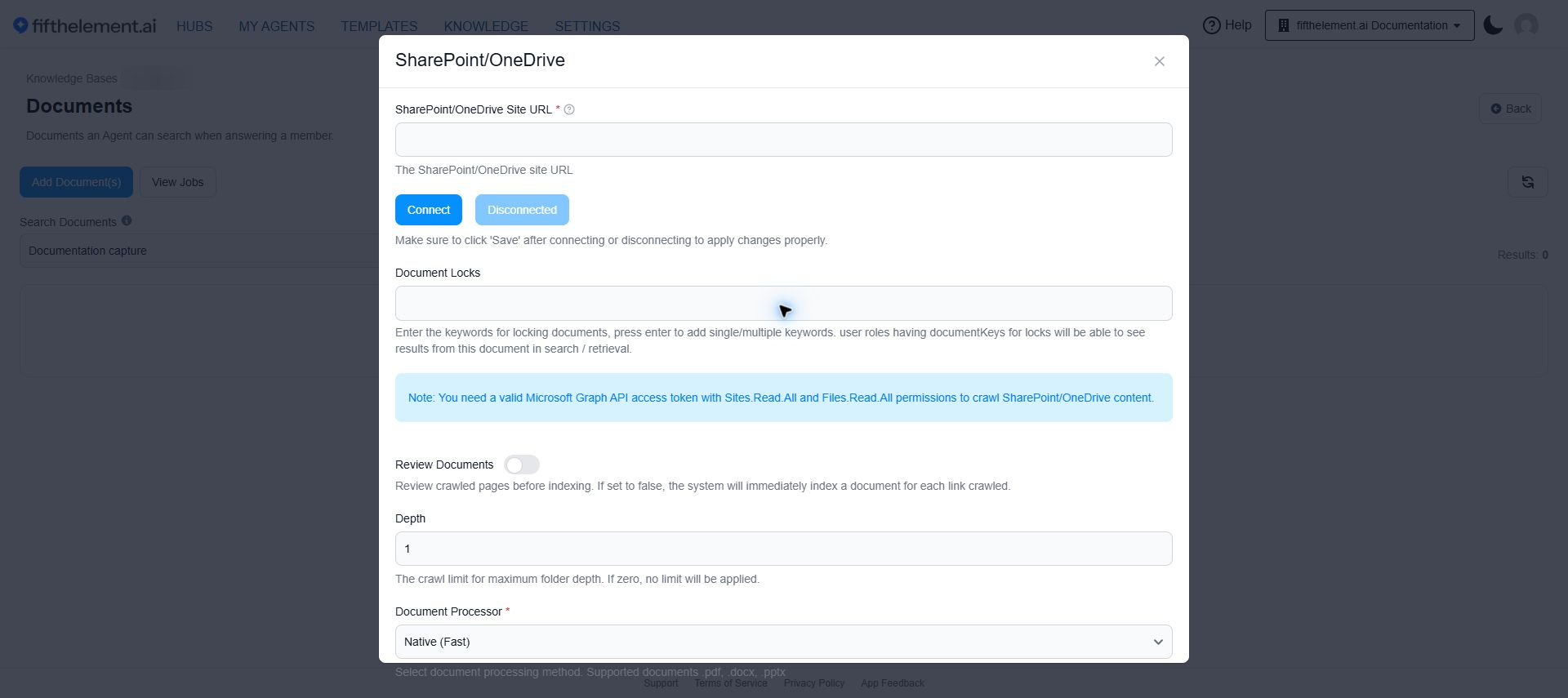
Crawl SharePoint/OneDrive sites and document libraries using Microsoft Graph API.
Configuration
| Field | Required | Default | Description |
|---|---|---|---|
| SharePoint/OneDrive Site URL | Yes | — | The SharePoint/OneDrive site URL |
| Connect | Yes | — | Authenticate with Microsoft. Click "Save" after connecting |
| Document Locks | No | — | Keywords for restricting document access |
| Review Documents | No | Off | Review crawled pages before indexing |
| Depth | No | 1 | Maximum folder depth. Set to 0 for no limit |
| Document Processor | Yes | Native (Fast) | Supports .pdf, .docx, .pptx |
Permissions Required
A valid Microsoft Graph API access token with Sites.Read.All and Files.Read.All permissions is required to crawl SharePoint/OneDrive content.
Additional Parameters
Expand Advanced parameters in the form.
| Field | Required | Default | Description |
|---|---|---|---|
| Max Items | Yes | 50 | Maximum files and folders to crawl |
| Min Content Length | Yes | 50 | Minimum content length for indexing |
| Include/Exclude Mode | Yes | Exclude | Choose whether to include or exclude filename patterns |
| Skip Path From Index | No | — | Regex patterns to skip during indexing |
| File Types | No | — | File extensions to include (e.g., pdf, docx). Leave empty for all supported types |
| Force Update | No | Off | Override pages even if source hasn't changed |
Human Assisted
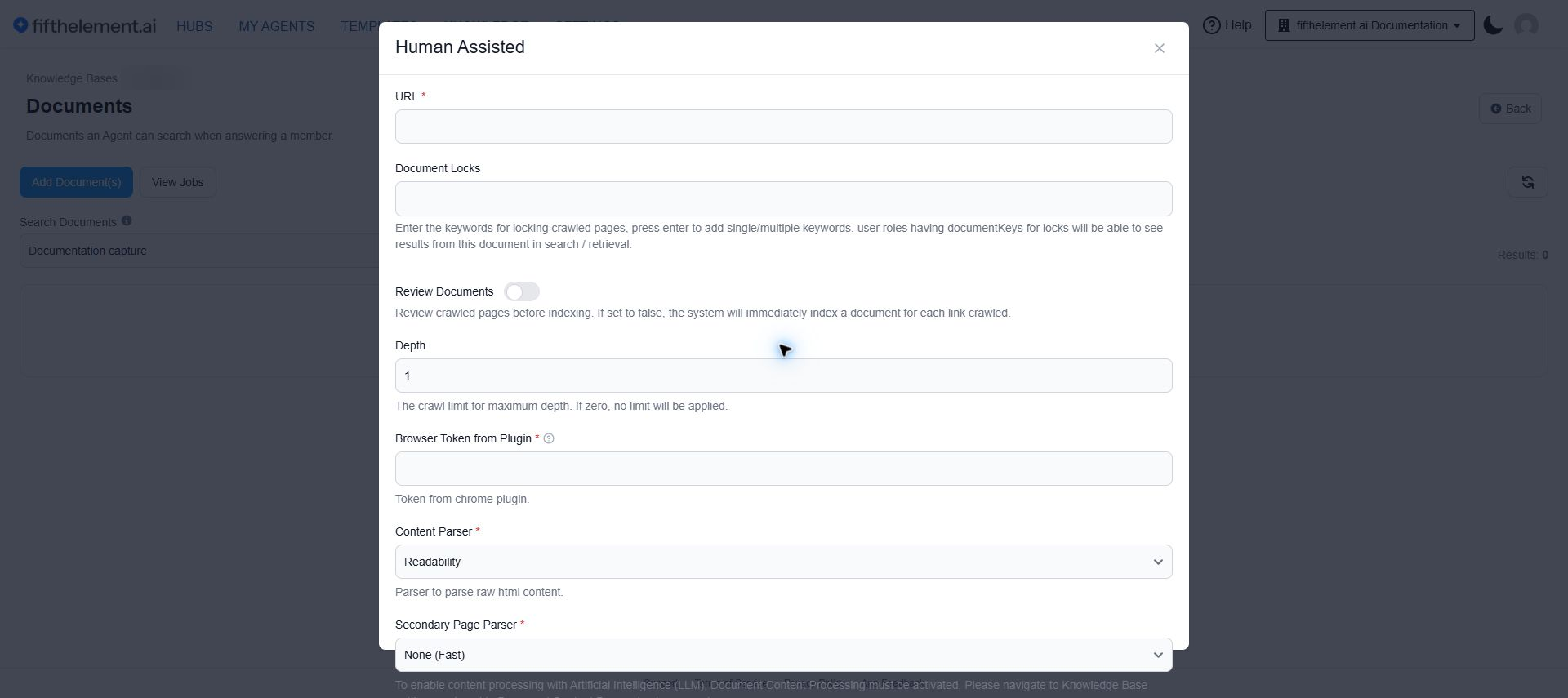
Crawl websites that require authentication or complex navigation using a Chrome browser plugin. The plugin uses the user's active browser session for crawling.
Configuration
| Field | Required | Default | Description |
|---|---|---|---|
| URL | Yes | — | Starting URL to crawl |
| Document Locks | No | — | Keywords for restricting document access |
| Review Documents | No | Off | Review crawled pages before indexing |
| Depth | No | 1 | Maximum crawl depth |
| Browser Token from Plugin | Yes | — | Token from the Chrome plugin |
| Content Parser | Yes | Readability | HTML content parser |
| Secondary Page Parser | Yes | None (Fast) | AI-powered content processing |
| Document Processor | Yes | Native (Fast) | Document processing method |
Browser Plugin Setup
- Download and extract the Assisted Crawling plugin to a folder
- Open Chrome, navigate to
chrome://extensions/and enable Developer mode - Click Load unpacked, select the extracted plugin folder, and confirm
- Click on details menu for the plugin and enable pin to toolbar
- Click the plugin icon on the toolbar and verify it is enabled and generating a token within 2-3 minutes
- Ensure plugin status shows as connected before starting any crawling job
Authentication
The browser token uses your active browsing session. Make sure you are logged in to the website and all subdomains you want to crawl.
Additional Parameters
Expand Advanced parameters in the form.
| Field | Required | Default | Description |
|---|---|---|---|
| Max Pages | Yes | 50 | Maximum pages to crawl |
| Min Content Length | Yes | 50 | Minimum content length for indexing |
| Include/Exclude Mode | Yes | Exclude | Include or exclude URL patterns |
| Skip Path | No | — | Patterns to skip during crawling |
| Skip Path From Index | No | — | Patterns to skip during indexing |
| External domains | No | Off | Allow external domains |
| Force Update | No | Off | Override pages if unchanged |
Job Monitoring
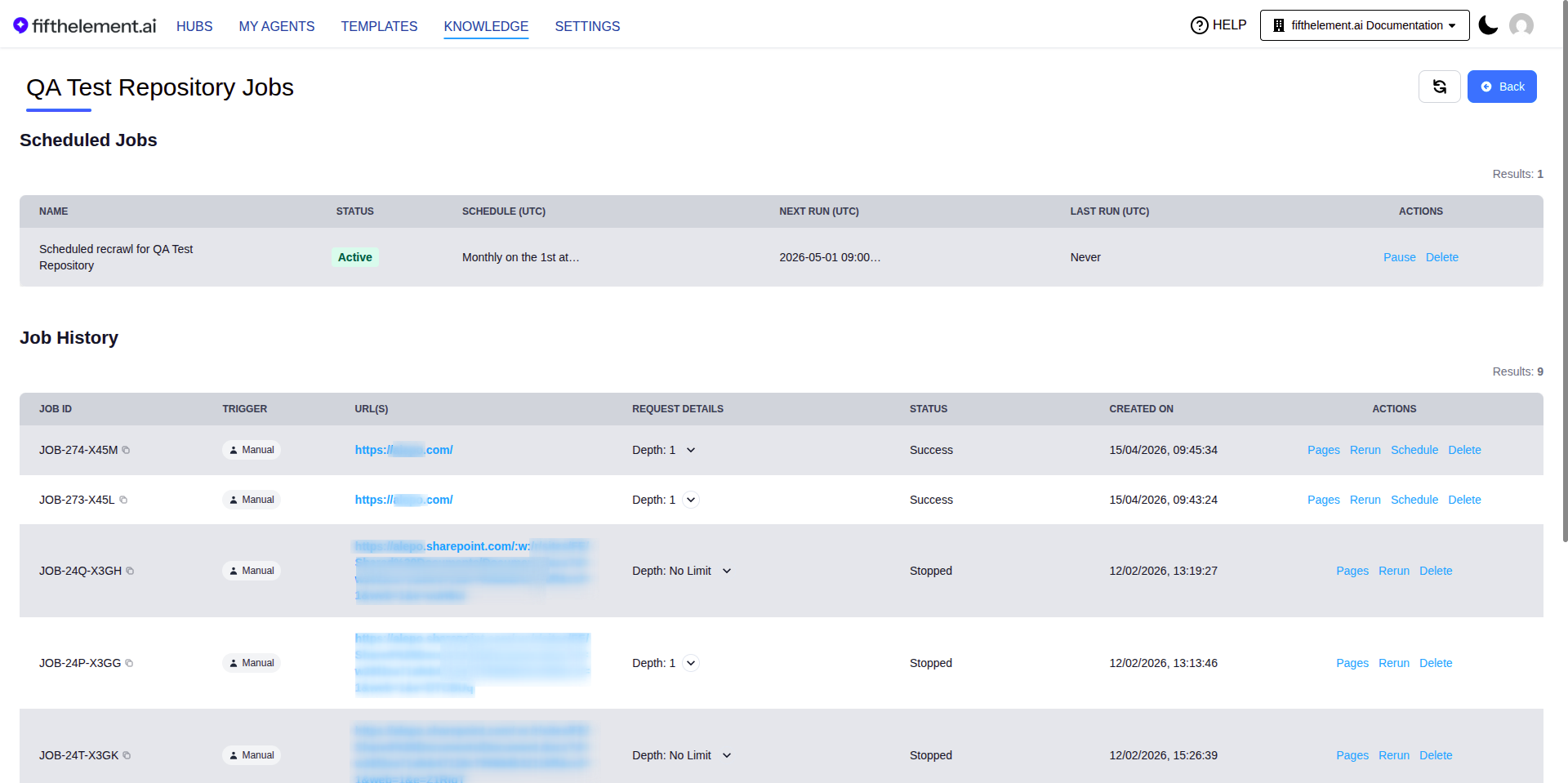
After starting a crawl, monitor progress via the View Jobs button on the knowledge base documents page.
Job History
| Column | Description |
|---|---|
| Job ID | Unique job identifier |
| Trigger | Manual or Scheduled |
| URL(s) | The crawled URLs |
| Request Details | Crawl parameters (depth, browser, parser, etc.) |
| Status | In Progress, Success, Failed |
| Created On | Job start time |
| Actions | Pages, Rerun, Schedule, Stop, Delete |
Scheduling Crawl Jobs
For Website and CSV URL Import crawl types, completed jobs can be scheduled to run periodically. The scheduler supports an expanded set of preset cadences — including Quarterly patterns with specific months baked in (e.g., Jan/Apr/Jul/Oct) and Twice Monthly options — plus a Custom Cron Expression field for anything the presets don't cover.
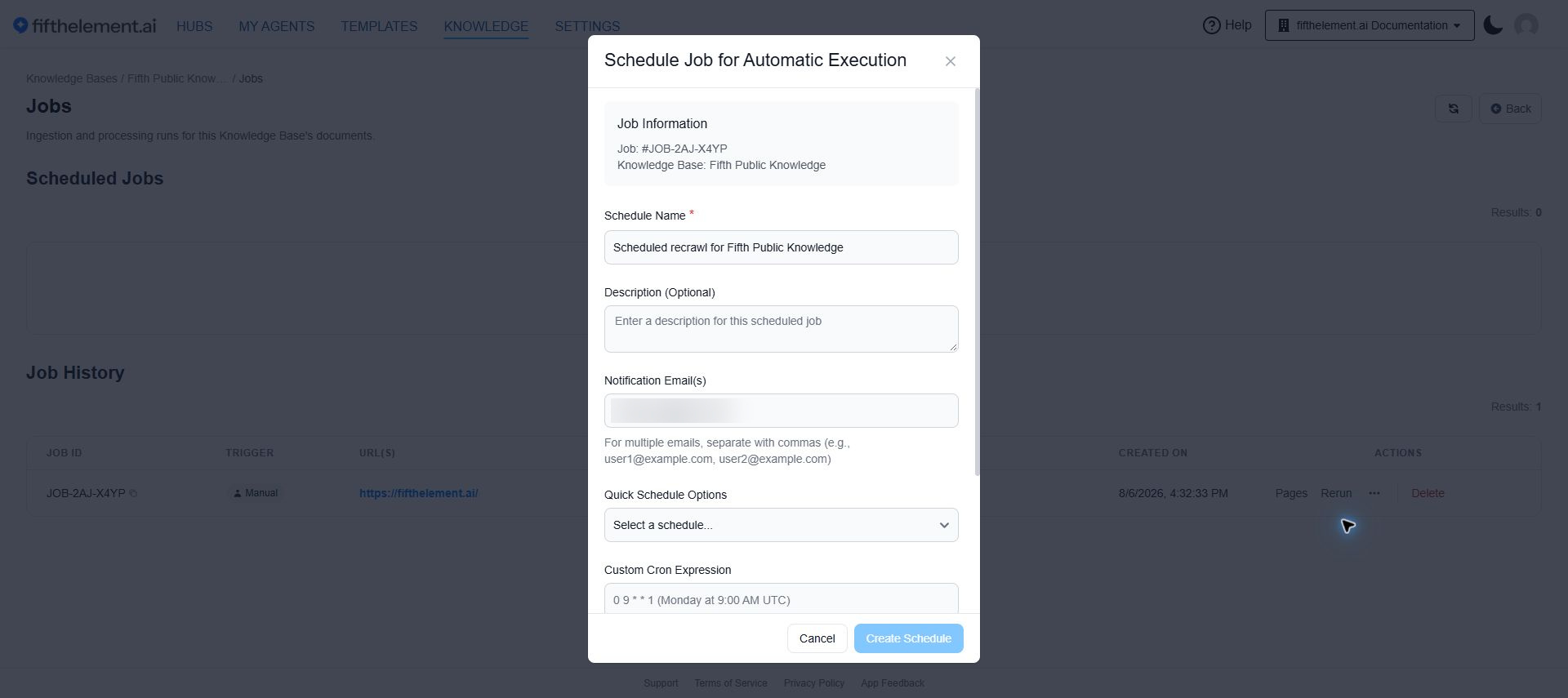
- Open More actions (the three-dot menu) on the job row and select Schedule.
- Enter a Schedule Name and optional description and notification emails.
- Select Quick Schedule Options or enter a Custom Cron Expression.
- Review the UTC cadence and click Create Schedule.
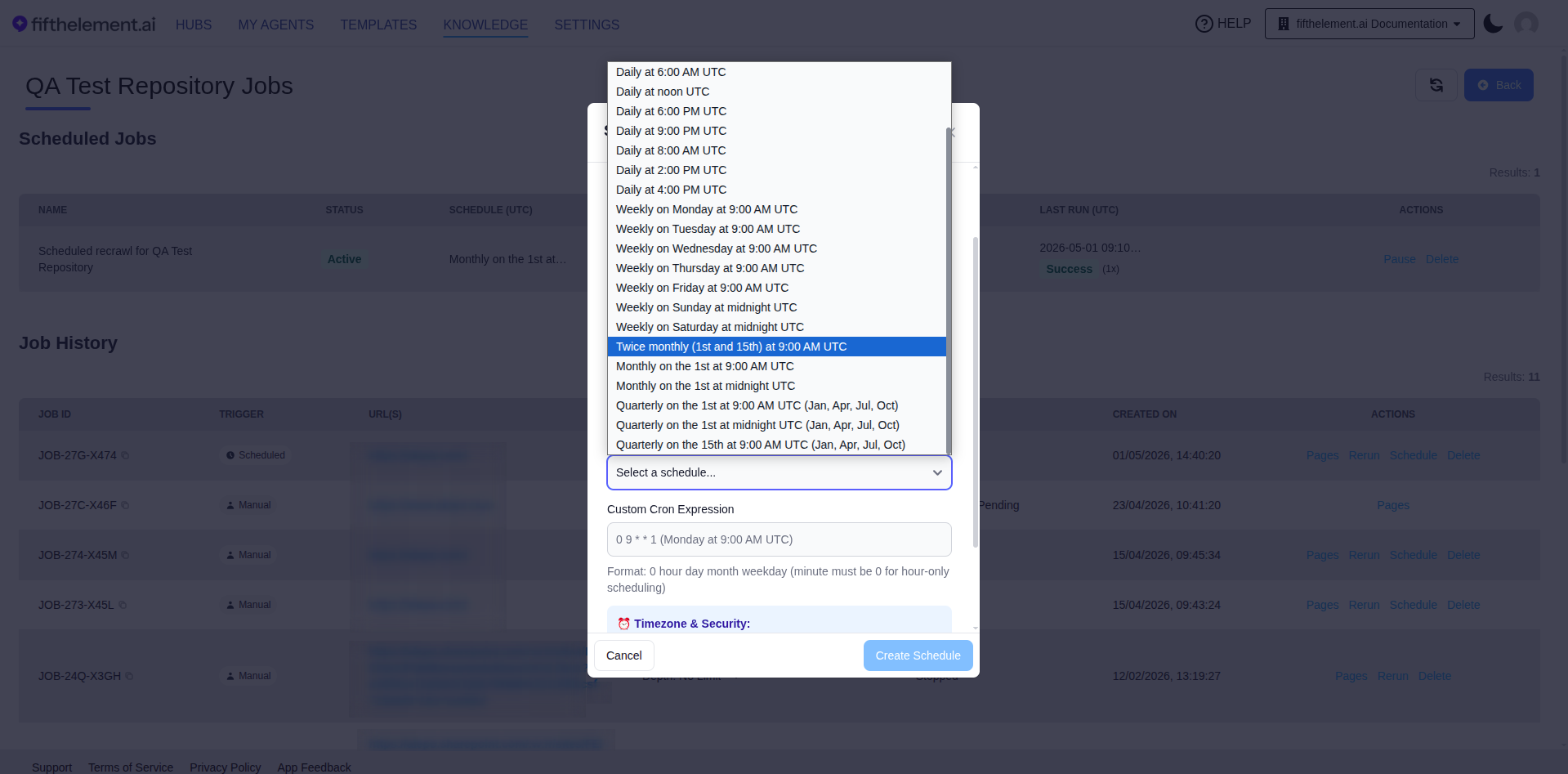
Schedule form with the quarterly preset selected. The notification email is blurred.
| Field | Required | Description |
|---|---|---|
| Schedule Name | Yes | Descriptive name for the scheduled job |
| Description | No | Optional description |
| Notification Email(s) | No | Email addresses to notify (comma-separated) |
| Quick Schedule Options preset | No | Pick a preset cadence — Daily / Weekly / Monthly / Twice Monthly / Quarterly (each preset encodes its day(s), time, and target months) |
| Custom Cron Expression | No | Custom cron (format: 0 hour day month weekday). Minute must be 0 for hour-only scheduling. Use for advanced cadences the presets don't cover (e.g., specific month combinations not in the preset list) |
Cadence Examples
| Need | Configuration |
|---|---|
| Every quarter (Jan, Apr, Jul, Oct) | Pick Quarterly on the 1st at 9:00 AM UTC (Jan, Apr, Jul, Oct) (or one of the other quarterly presets) |
| Twice a month (1st & 15th) | Pick Twice monthly (1st and 15th) at 9:00 AM UTC |
| Custom months not in any preset | Provide a Custom Cron Expression — e.g., 0 9 1 3,6,9,12 * for the 1st of Mar/Jun/Sep/Dec at 9:00 AM UTC |
UTC Timezone
All schedules use UTC. Custom cron expressions must use the supported five-field format and have minute set to 0. A repeating interval such as every 14 days is not necessarily representable as a single cron expression.
Related Topics
- Document Ingestion — Upload files and manage documents
- RAG Overview — How retrieval-augmented generation works
- Vector Search — How documents are searched and retrieved
- Back to Knowledge