Agent Builder
Complete reference for every section and field in the Agent Builder.
Overview
The Agent Builder is a modular page. It opens with a mandatory core — Identity and Brain — and every other capability is a self-contained module you add on demand.
This page is the full field-by-field reference. For a guided walkthrough, start with Basic Configuration; for detail on each module, see Advanced Configuration.
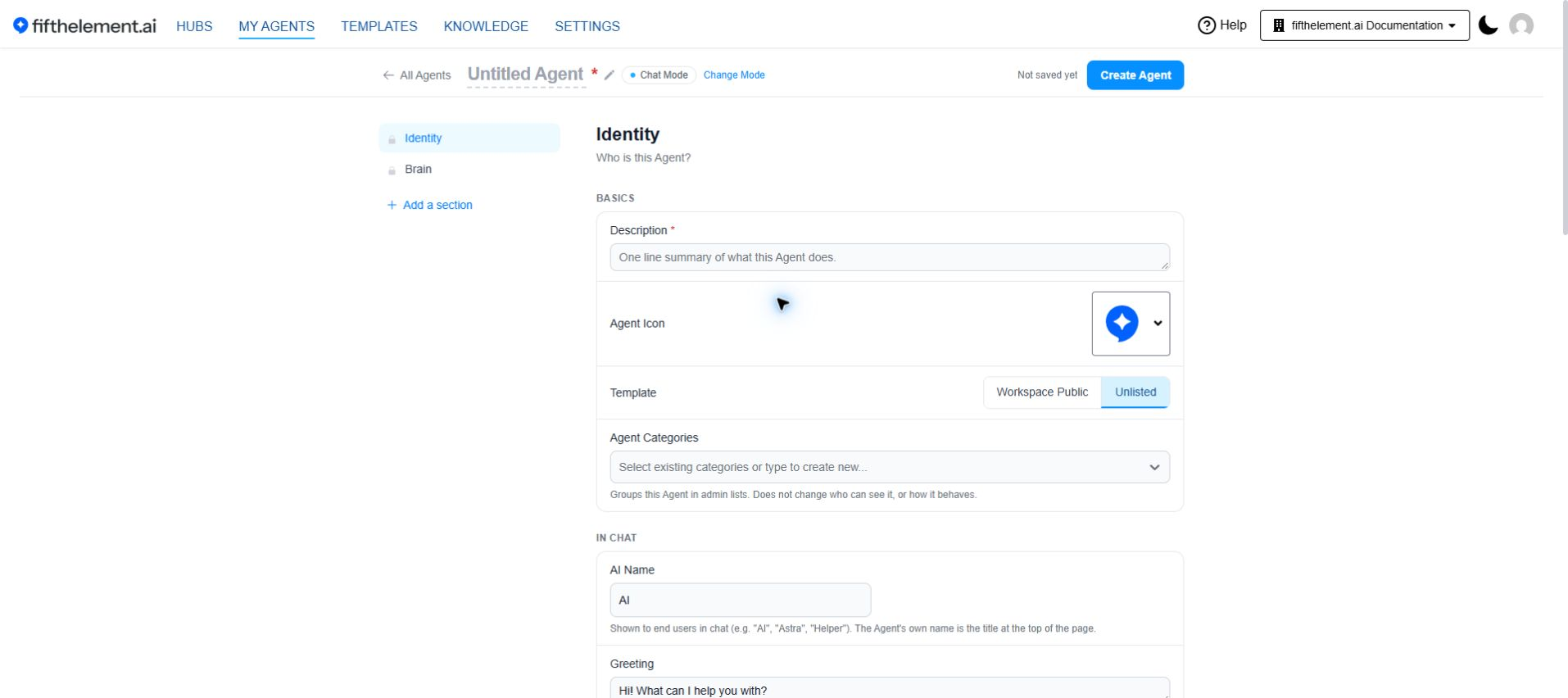
The Builder opens with Identity and Brain only — everything else is added from Add a section
Prerequisites
- Access to https://PLATFORM-URL-PLACEHOLDER
- Permission to create or edit agents
- Configure shared models, tools and processors in Settings. Manage Knowledge Bases under Knowledge.
Page Anatomy
| Element | Description |
|---|---|
| Agent name | Inline-editable heading at the top of the page. Reads Untitled Agent until set |
| Mode chip | Chat Mode or Search Mode |
| Change Mode | Returns to the mode picker. Shown while creating an agent |
| Save state | Shows Not saved yet, an unsaved-change count, or All saved |
| Agent sections sidebar | Lists sections on the left and navigates to them |
| Add a section | Opens the searchable section chooser |
| Create Agent / Save | Sticky header action for creating or saving an agent |
| Back to Agent | Returns to the agent, when editing an existing one |
| Compare Version | Opens version comparison. See Version Control |
In the sidebar, Identity and Brain carry a lock icon and cannot be removed. Optional sections have reorder handles: drag them, or focus a handle and use the arrow keys. Open a section's actions menu to remove it.
Agent Modes
Agent creation opens with a mode choice: "What kind of Agent are you building?"
| Mode | Description |
|---|---|
| Chat | A conversational Agent that answers questions and helps users in real time |
| Search | Retrieves answers from your knowledge first, then summarises with citations |
The mode decides which modules and defaults are pre-loaded.
| Chat | Search | |
|---|---|---|
| Search Mode selector in Identity | — | Yes |
| Search Filters section | — | On the page by default |
| Capabilities modules offered | Tools & Artifacts, Voice, Prompt Shortcuts, Pre Processors, Post Processors | Tools, Pre Processors, Post Processors |
| Knowledge modules offered | Knowledge Bases | Search Filters |
| Distribution modules offered | Channels | Channels |
| Tuning modules offered | Behavior Flags, Advanced Model Params, Agent Parameters, Documentation | Behavior Flags, Advanced Model Params, Agent Parameters, Documentation |
Identity
Mandatory. "Who is this Agent?"
| Field | Required | Description |
|---|---|---|
| Agent name | Yes | Set inline at the top of the page. Internal identifier used in the platform, logs, and management |
| Description | Yes | One line summary of what this Agent does |
| AI Name | No | Shown to end users in chat (e.g. "AI", "Astra", "Helper"). Defaults to AI |
| Greeting | No | Shown as the first message in the chat window |
| Notes | No | Internal notes, not shown to users |
| Agent Icon | No | Icon displayed before the agent's name in the chat interface |
| Template | No | Workspace Public or Unlisted (default) |
| Agent Categories | No | Groups the agent in admin lists without changing visibility or behavior |
| Remarks | — | Read-only provenance line shown when editing an existing agent — for example, that it was cloned from another agent with its source name, ID and version |
| Search Mode | Search agents only | Search, AI, or User Selectable (default). User Selectable lets the end user toggle between AI and Search mode |
Brain
Mandatory. "How does it think?"
Instructions
| Field | Description |
|---|---|
| Instructions | The system instruction steering every reply — how the Agent should behave, its tone, what it should refuse |
| Special Instructions | Special / additional instructions. Referenced via the {special_instructions} placeholder |
| Current Message Prompt | Appended or prepended to each user message. Use {message} as a placeholder; if omitted, the current message is appended at the end |
| Conversation Inactivity Message | When enabled, sends the configured message exactly as written when the conversation becomes inactive, according to the current field help |
| + Add Instruction | Adds further instruction blocks |
Controls available on the instruction fields:
| Control | What it does |
|---|---|
| Default | Restores the built-in wording |
| Generate with AI | Drafts a full instruction set from a short prompt, for review before applying |
| Insert Condition | Adds a tag-based conditional instruction block |
| Verify | Validates the condition syntax |
Placeholders {special_instructions} and {user_instructions} are substituted at runtime.
Available User Data
Use {{data.userInformation.email}}, {{data.userInformation.name}} and {{data.userInformation.id}} in prompts to personalize responses. Available for logged-in users on Web App and Sidebar. For dynamic user data parameters, use {{data.keyname}}.
Models
| Field | Required | Description |
|---|---|---|
| Available Language Models | Yes | One or more models. Each row carries Default / Set Default, a Tag selector limiting that model to conversations with a specific tag, an edit (pencil) icon opening Modify Language Model, and a delete icon |
Modify Language Model (per-model)
The pencil icon on a model row opens Modify Language Model — parameters that apply to that one model on this agent.
| Field | Description |
|---|---|
| Language Model | The workspace model this row points at |
| Add Tag | Tag that scopes this model |
| Display Name | Name shown for this model |
| Description | Free-text note |
| Temperature | Slider controlling randomness |
| Max Output Tokens | Cap on output. The field shows the model's maximum and a recommended value |
| Per 1k Tokens Price ($) | Used for live cost display. Requires Display Session Cost under Behavior Flags |
| Max Messages in History | How many prior messages are passed. The field shows a per-model recommendation |
| History Tokens Threshold | Token count past which the history strategy kicks in. The field shows a per-model recommendation |
Three places models are configured
Keep the levels straight:
| Level | Where | What lives there |
|---|---|---|
| Workspace | Settings → Language Models | Model name, credential, provider model, Thinking Level |
| Per model, per agent | Brain → model row → pencil | The Modify Language Model fields above |
| Agent-wide | Advanced Model Params | Use Chat History, summarization, condense-question, Large Context Processing Algorithm |
Voice
Language Models are not used during Realtime Voice interactions.
Modules
Click Add a section in the left sidebar, then search or browse the available sections.
| Group | Module | Purpose |
|---|---|---|
| CAPABILITIES | Tools & Artifacts | Retrieval, API calls, static text, custom logic, document generation |
| Voice | ASR, TTS and realtime speech-to-speech | |
| Prompt Shortcuts | Predefined and AI-generated quick actions | |
| Pre Processors | JavaScript that runs before the LLM, setting tags | |
| Post Processors | LLM evaluation after a turn or a conversation | |
| KNOWLEDGE | Knowledge Bases | Text, documents and knowledge repositories |
| DISTRIBUTION | Channels | Web App, Sidebar, Floating Widget and sign-in rules |
| TUNING | Behavior Flags | Debugging, UX toggles, encryption, analytics, email notifications |
| Advanced Model Params | Chat history, summarization, large-context handling | |
| Agent Parameters | Reusable {botParams.<key>} variables | |
| Documentation | User-facing guide and Welcome Screen HTML |
The chooser also includes these sections. Widget and Floating Widget Auth require Floating Widget to be enabled in Channels; Translation can be added separately:
| Module | Purpose |
|---|---|
| Widget | New-conversation button, error message, allowed domains |
| Floating Widget Auth | No Authentication / Required Login / Optional Login |
| Translation | Translation toggle, model and prompt |
Search agents additionally carry Search Filters.
Module Field Summary
Channels
| Field | Description |
|---|---|
| Web App | Access the agent directly by typing its address |
| Sidebar | Use the agent as a sidebar to an internal or external website |
| Floating Widget | Classic website agent for assisting visitors |
| Customize widget | Opens widget appearance settings |
| Web App & Sidebar Security | Sign-In Required or Sign-In Optional |
Tools & Artifacts
| Field | Description |
|---|---|
| + Add Tool | Attaches a tool configured in Settings |
| Tag (per tool) | Limits the scope to conversations with a specific tag |
| Artifacts | Toggles document-generation artifacts on or off for this agent |
Tool types include Retrieval, Context, Playbook, Webhook, Custom, User Memory and Data Visualization.
Voice
| Field | Description |
|---|---|
| Push To Talk | Hold to speak rather than streaming continuously |
| Speech Recognition Model (Input) | ASR model |
| Text To Speech Model (Output) | TTS model |
| Realtime Voice Processing | Enable / Disable |
| Launch in Voice Mode by Default | Enable / Disable. Default Disable. Opens the agent straight on the voice screen |
| Realtime Voice Model (Includes AI Listens) | Required. The realtime model |
| SIP Realtime Voice Processing | Enable / Disable. Telephony |
| Websocket Realtime Voice Processing | Enable / Disable. Browser-based voice |
Prompt Shortcuts
| Field | Description |
|---|---|
| + Add Shortcut | Label, prompt/hyperlink, one-off tag, hyperlink flag and chat-history flag |
| User Defined Shortcuts | Allow / Disallow |
| AI Generated Shortcuts | Allow / Disallow |
| Number of AI Shortcuts | 1 to 5. Default 3 |
| AI Shortcut Generation Template | Prompt template with a live token count |
Pre Processors
| Field | Description |
|---|---|
| + Add Pre Processor | Attaches a processor configured in Settings |
| Static Agent Tags | Predefined labels that customize agent behavior and appearance |
Post Processors
| Field | Description |
|---|---|
| + Add Post Processor | Turn Post Processor or Conversation Post Processor |
Knowledge Bases
| Field | Description |
|---|---|
| Limit Context Token / Context Token Limit | Caps context size. If available tokens are fewer than the limit, available tokens are used |
| Use Dynamic Context from the Webpage | For Floating Widget / Sidebar agents |
| + Add Context | Text, Document, or Knowledge Base |
Warning
Add the Context Tool under Tools & Artifacts to enable context usage with the agent.
Behavior Flags
Grouped into Debug and Development, Language Model Control, User Experience, User Capabilities, Context and Title Generation, Conversation Management, Security and Encryption, Analytics, and Email Notification. See Behavior Flags for every toggle.
Advanced Model Params
| Field | Description |
|---|---|
| Use Chat History | Pass prior messages to the model on each turn |
| History Summary Strategy | Truncate (default) or Summarize |
| Summarizer Model | Required when summarizing |
| History Summary Instructions | Prompt maintaining the rolling summary. Keep {max_summary_tokens} |
| Condense Question Before Retrieval | Rewrites the question into a standalone query |
| Condense-Question Model | Required when condensing |
| Large Context Processing Algorithm | Required. Truncate, LLM Prompt Chaining, or Embeddings |
| Embedding Model | Required for the Embeddings algorithm |
Agent Parameters
Key-value pairs referenced in instructions as {botParams.<key>}.
Documentation
| Field | Description |
|---|---|
| Title | Title displayed above the documentation |
| Content | Rich text guide opened from the agent documentation button; its label follows the configured Title |
| Welcome Screen HTML | Initial state of a new chat on Web App and Sidebar. Supports Preview, Use template, Generate with AI and Revert |
Widget
| Field | Description |
|---|---|
| Allow Users to Start a New Conversation | Shows a "New conversation" button in the widget toolbar |
| Error Message | Shown when the Agent cannot respond |
| Allowed Domains | Comma-separated hostnames. Blank allows all origins |
Floating Widget Auth
No Authentication, Required Login, or Optional Login.
Translation
| Field | Description |
|---|---|
| Translation | Enable / Disable |
| Translation Language Model | Required. Model used for translation tasks |
| Translation Prompt | Prompt used for translation tasks |
Search Filters
Search agents only. Define search filter rules with Add rule.
Warning
To use the Vector Store Key dropdown, first select a retrieval tool in the Tools section.
Creating and Saving
Use Create Agent in the sticky header while creating, or Save when editing. The header shows Not saved yet, an unsaved-change count, or All saved.
Related Topics
- Agent Builder - Basic Configuration - Guided setup for a working agent
- Agent Builder - Advanced Configuration - Every module in detail
- Artifacts - Document-generation artifacts
- Agent Reports - Monitor agent performance and analytics
- Agent's Look & Feel - Customize branding and appearance
- Cloning an Agent - Duplicate and modify existing agents
- Version Control - Manage agent versions and rollback
- Settings > AI Models - Manage available models
- Settings > Tools - Create and configure tools